
SpinFlight Spinner Firmware UpdateUpdated 4 months ago
The following instructions will update your spinner to move diagonally instead of just horizontal or vertical. Diagonal is advantageous as it makes the spinner work for horizontal games and vertical games without having to switch between the two modes.
1. Download the Spinner configuration software:
https://cdn.shopify.com/s/files/1/0065/4956/9647/files/GRS_Spinner_Ultra_Configuration_Tool-1.4.zip?v=1781553099
2. Download the Polycade Spinner Firmware:
https://cdn.shopify.com/s/files/1/0065/4956/9647/files/SpinnerUltra_DOT_2_62_1.bin?v=1781553052
3. Unzip the spinner configuration software and double click the executable file to install. By default, it will install to C:\Program Files (x86)\GRS Spinner Ultra Configuration Tool\
4. Open the install directory (C:\Program Files (x86)\GRS Spinner Ultra Configuration Tool\) and double click "GRS Spinner Ultra Configuration Tool.exe"
5. In the configuration software, click "Firmware Update" in the top left corner.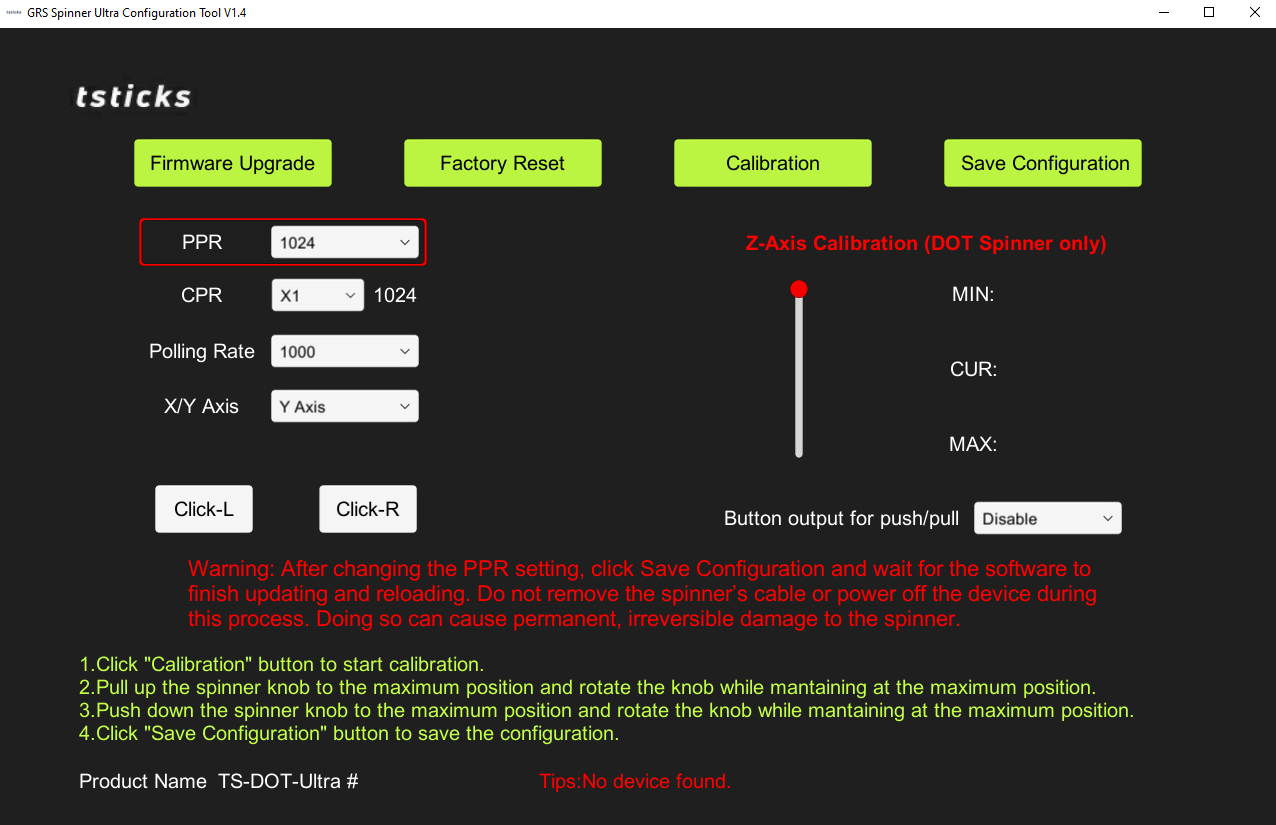
6. In the window that opens, navigate to your downloads folder and select the Polycade firmware you downloaded in step 2.
7. Change the "X/Y Axis" to "Y Axis".
8. Click "Save Configuration"
9. Done!